
How Fence Calculators Help Estimate Materials
Buying materials for a fence project without a plan is a recipe for wasted money — either you overspend on excess lumber sitting in your garage, or you run short halfway through and end up making an emergency trip to the hardware store. Fence calculators solve this problem by turning a few basic measurements into a complete, itemized materials list. This article explains exactly how these tools help estimate materials, what goes into the calculation, and why using one can save you both time and money on your next project.
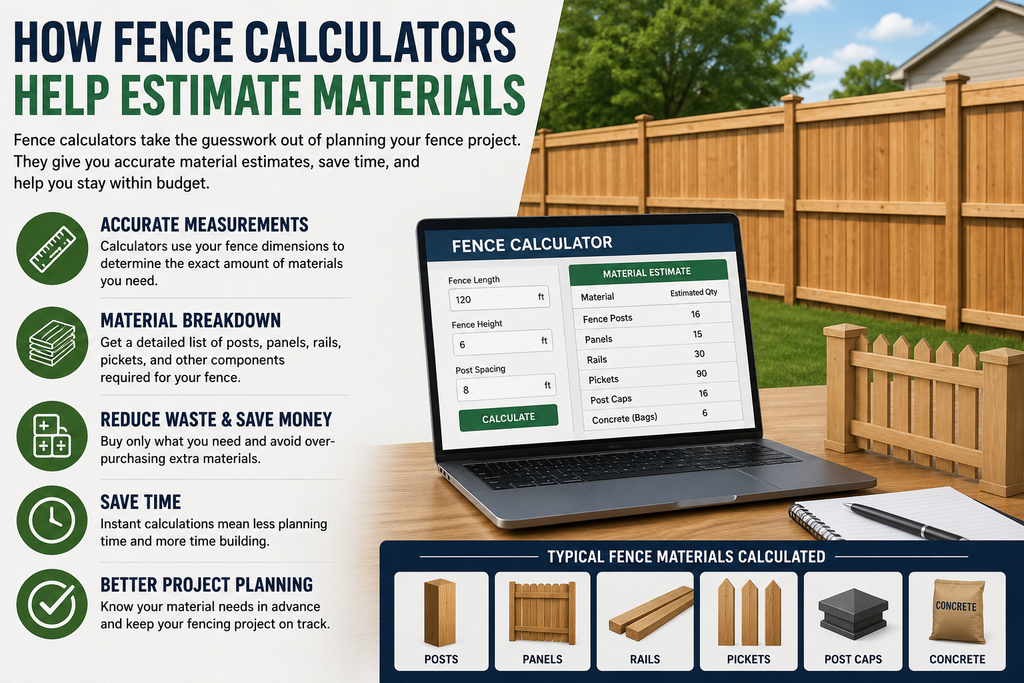
Why Estimating Materials Matters
Fencing is a project where small errors compound quickly. Miscounting posts by even a few units can throw off your rail and panel counts, your concrete needs, and your hardware order. Buying too little means delays and multiple supplier trips; buying too much ties up money in materials you’ll never use. A good estimate strikes the balance — enough material to finish the job with a small safety margin, without excessive waste.
Fence calculators exist to remove the guesswork from this process by applying consistent, standardized formulas to your specific measurements.
What Information the Calculator Needs From You
To produce an accurate materials list, most calculators ask for:
- Total linear footage of the fence line
- Fence height (4, 6, or 8 feet are common)
- Fence type or material (wood, vinyl, chain link, aluminum, etc.)
- Number of corners or direction changes
- Number and width of gates
- Post spacing preference, if the tool allows customization
The more precise your inputs, the more accurate the resulting materials estimate will be. This is why walking your property and measuring carefully before opening a calculator matters more than which specific tool you use.
How the Calculator Breaks Down Materials
Once you enter your measurements, the calculator works through several categories of material, each with its own formula.
Posts
Posts are calculated first, since everything else depends on them. The formula is generally:
Posts = (Linear Footage ÷ Post Spacing) + 1
Corner and gate posts are added on top of this base number, since they typically require heavier-duty materials to handle the additional structural load at turns and openings.
Rails or Panels
Depending on the fence style, the calculator either counts horizontal rails (common for rail and picket fences) or pre-manufactured panels (common for privacy and vinyl fencing). Panel count is based on dividing your linear footage by standard panel width, while rail count multiplies your number of post sections by the number of rail rows in your chosen design (2-rail, 3-rail, or 4-rail are typical).
Pickets or Infill
For picket-style fences, the calculator estimates individual picket count based on picket width and your desired spacing between each one — tighter spacing for privacy, wider spacing for a more open, decorative look.
Concrete
Post-setting concrete is estimated per post, typically one 50-lb bag for standard fences and two bags for taller privacy fences with deeper holes. Some calculators adjust this automatically based on your selected fence height.
Hardware and Fasteners
This includes post caps, brackets, screws or nails, and gate hardware like hinges and latches. Fastener quantities are usually estimated by weight or box count based on your total panel or picket count.
Gates
Gates are calculated separately from the main fence run because they involve different framing and support requirements. The calculator typically asks for gate width and quantity, then adds the appropriate hardware kit for each one.
How the Calculator Turns Materials Into a Cost Estimate
Once the full materials list is generated, most calculators multiply each item by current average pricing to produce a total estimated cost. This gives you a starting budget, though local supplier pricing can vary, so it’s worth comparing the calculator’s estimate against a quote from a nearby lumber yard or fencing supplier.
Why Estimates Include a Waste Buffer
Good fence calculators build in a small buffer — usually 5–10% — on top of the raw material count. This buffer covers:
- Cutting waste, especially on irregular or sloped fence lines
- Materials damaged during shipping or installation
- Minor measurement inconsistencies
- Future repairs, so you have spare material on hand
If your calculator doesn’t mention a buffer explicitly, it’s a good idea to add 5–10% to your final order yourself, especially for wood or picket fencing where cutting waste is more common.
Where Calculators Can Fall Short
While fence calculators are a strong starting point, they have limitations worth knowing about:
- Sloped terrain: Most basic calculators assume flat ground. Sloped yards often require stepped or racked panels, which can increase material needs beyond the standard estimate.
- Frost line depth: Post-hole depth (and therefore concrete needs) can vary by region due to frost line requirements, which generic calculators don’t always account for.
- Custom designs: Decorative caps, lattice toppers, or mixed materials usually need to be added manually, since calculators are built around standard configurations.
- Local pricing accuracy: Cost estimates often reflect national averages rather than your specific region.
Because of these gaps, it’s smart to treat the calculator’s output as a strong first draft, then review it against your site conditions before finalizing your order.
Getting the Most Accurate Estimate
To get the most reliable materials list from a fence calculator:
- Measure your property carefully, including every corner and gate location.
- Choose the correct fence type and panel width to match the product you plan to buy.
- Use a manufacturer-specific calculator when available, since it will match exact product dimensions.
- Add a waste buffer if the calculator doesn’t already include one.
- Cross-check post depth and concrete needs against your local building codes and frost line.
FAQs
1. Can a fence calculator estimate materials for any fence type? Most calculators cover common types like wood, vinyl, chain link, and aluminum. More specialized designs, like custom ironwork or mixed-material fences, may need manual adjustments beyond the calculator’s default output.
2. How accurate are the cost estimates from fence calculators? They’re typically accurate within 10–15% for materials, though labor costs and regional pricing differences can cause larger variances. Use the estimate as a planning tool, not a final quote.
3. Do fence calculators account for gates automatically? Many do, as long as you enter the gate width and quantity. If a calculator doesn’t have a dedicated gate field, you’ll need to subtract gate width from your linear footage manually.
4. Will a fence calculator tell me how much concrete I need? Most will provide an estimate based on post count and standard hole depth, though you should adjust this if your region has deeper frost line requirements.
5. Is it worth using a calculator if I’m hiring a contractor anyway? Yes. Having your own materials estimate helps you evaluate whether a contractor’s quote is reasonable and gives you a useful reference point during price negotiations.
6. Should I round up or down if the calculator gives a decimal number? Always round up. Materials like posts and panels are sold as whole units, and rounding down will leave you short during installation.
Final Thoughts
Fence calculators take the manual guesswork out of materials planning by applying consistent formulas to your measurements, covering everything from posts and panels to concrete and hardware. While they aren’t perfect — especially on sloped terrain or custom designs — they give you a reliable starting point for budgeting and ordering. Pair the calculator’s output with a careful review of your site conditions, and you’ll walk into your project with a materials list you can actually trus