
Fence Material Calculators How to Estimate Posts
Few things derail a fencing project like a second trip to the supply yard. Order too little and your crew sits idle. Order too much and you’ve paid for pickets and concrete bags that never leave the garage. A fence material calculator takes a few measurements and turns them into a shopping list, which makes budgeting far easier.
What a Fence Material Calculator Does
A fence material calculator estimates how much of each component your project needs. You typically enter fence length, height, post spacing, fence style and the number of gates. The tool returns quantities for posts, rails, pickets or panels, hardware and concrete, and often a rough cost.
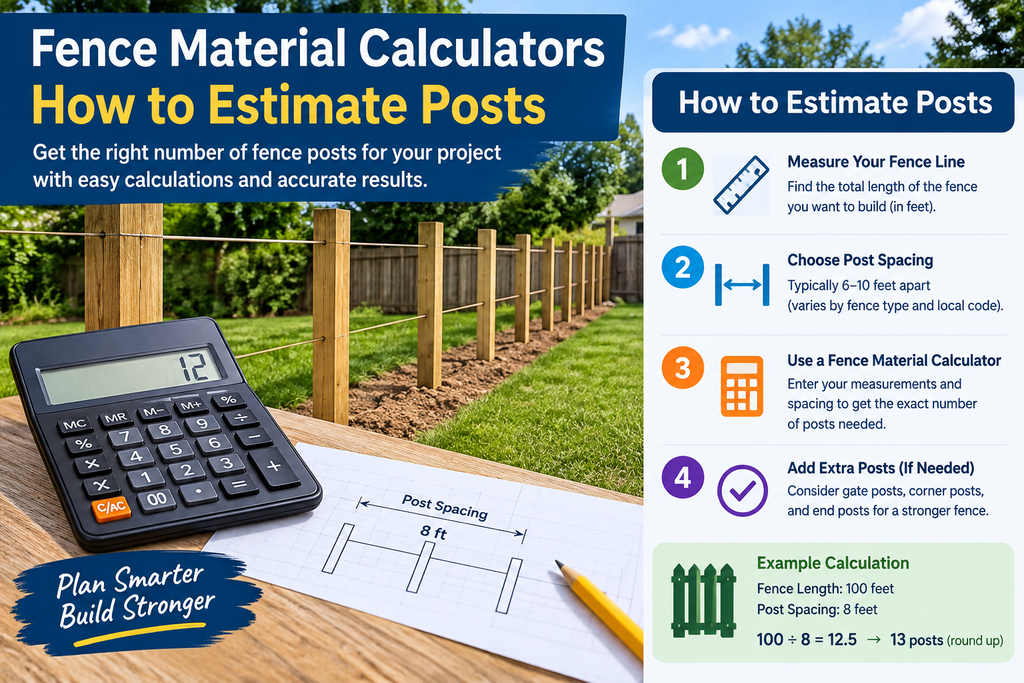
The math behind it is simple. Divide the total length by your post spacing, usually 6 to 8 feet, then add one post to close the run. Rails, panels and pickets follow from the number of sections. Concrete depends on post size, hole size and fence height.
Who Offers Fence Calculators?
You have several types of provider to choose from:
- Fence suppliers and manufacturers. Hoover Fence publishes free calculators aimed at homeowners and contractors, including a separate concrete estimator. Because they sell the products, their tools tend to reflect real component sizes.
- General calculator sites. Omni Calculator offers a fence material tool for wood and vinyl, and it recommends buying about 10% extra to cover mistakes and future repairs.
- Contractor software and tools sites. Invoicer.ai bundles a fence calculator with concrete and stain estimators, which suits builders who quote jobs quickly.
- Map-based tools. Mapscaping lets you trace your fence route on satellite imagery instead of typing a length, which helps on irregular lots.
- Mobile apps. Apps like Fence Calc Build work offline, so you can run numbers on site or in a store aisle.
How to Get an Accurate Estimate
1. Measure carefully. Measure the actual fence line, not the property outline. Note corners, slopes and obstacles such as trees.
2. Pick your post spacing first. Spacing changes everything downstream. Wider spacing means fewer posts but more load on each one, so match it to your fence type and local practice.
3. Count gates separately. Gates need heavier posts, hinges, latches and often extra bracing. Enter them as their own line item rather than as part of the standard run.
4. Add a waste allowance. Ten percent extra is a common rule of thumb. Wood fences with many cuts may need more.
5. Account for terrain. Calculators assume flat ground. Slopes, rocky soil and tight corners can change post depth, panel counts and concrete needs, so treat the output as a starting point.
6. Check local rules. Height limits, setbacks and permit requirements vary by location and can change your design before you buy anything.
Common Mistakes to Avoid
- Forgetting corner and end posts. These take more stress than line posts and are easy to undercount.
- Ignoring concrete. Bags per post add up fast on long runs.
- Mixing units. Feet versus metres is a classic source of costly errors.
- Trusting cost estimates blindly. Material prices shift, so use the quantities from a calculator and get current prices from your supplier.
- Skipping a site walk. A calculator can’t see the buried irrigation line or the boulder where a post should go.
Choosing the Right Calculator
Match the tool to your situation. Whichever you pick, run two different calculators and compare the results. A large gap usually means an input mistake.
FAQs
How many fence posts do I need?
Divide the total fence length by your post spacing, then add one. For 100 feet at 8-foot spacing, that’s 12.5 sections, so round up to 13 sections and 14 posts. Add extra posts for gates and corners.
How much extra material should I buy?
Around 10% extra is a common recommendation to cover cutting errors and future repairs.
Are online fence calculators accurate?
They’re accurate for the inputs you provide and the assumptions they use. Terrain, gate placement, post spacing and installation method can all change real-world needs, so treat results as a planning baseline.
How much concrete does each post need?
It depends on post size, hole diameter and fence height. One common app assumes one to three 50 lb bags per post depending on fence height. A dedicated post concrete calculator will give a tighter figure.
Can a calculator estimate cost?
Many can, but the price is only as good as the rate you enter. Confirm current prices with your local supplier.
Do calculators work for every fence type?
Most cover wood, vinyl, chain link, aluminum and split rail. Specialty fences such as ornamental iron or agricultural wire may need a supplier’s own tool or a quote.
What’s the standard post spacing?
Six to eight feet is typical for many residential fences, though the right figure depends on material, height and wind exposure.
Do I still need a professional?
Not necessarily for planning, but for large, sloped or permit-heavy projects a contractor’s site assessment is worth it.
Final Thoughts
A fence material calculator won’t replace a site visit, but it turns guesswork into a list you can price and order from. Measure carefully, pick a spacing, include gates and a waste allowance, and cross-check two tools. You’ll spend less time on supply runs and more time building.