
How Does a Fence Material Calculator Work
Building a fence is one of those home improvement projects that looks simple on paper but quickly gets complicated once you start figuring out exactly how much lumber, concrete, and hardware you actually need. Buy too little, and you’re making multiple trips to the hardware store. Buy too much, and you’ve wasted money on materials sitting unused in your garage. This is where a fence material calculator becomes an essential planning tool. It takes the guesswork out of estimating quantities and helps you budget accurately before you ever pick up a shovel or a saw.
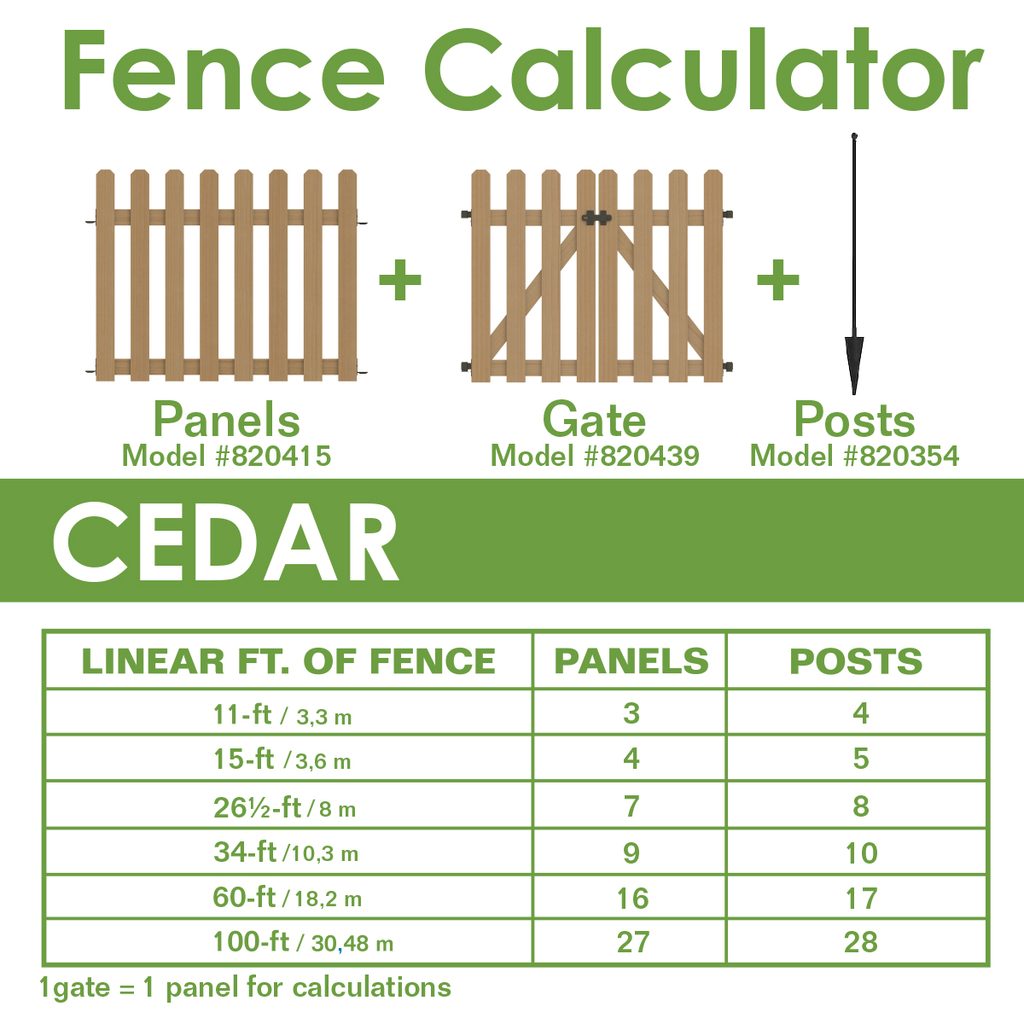
In this article, we’ll break down exactly how these calculators work, what inputs they need, and how the math behind them translates into a shopping list you can trust.
The Basic Concept Behind a Fence Calculator
At its core, a fence material calculator is a tool that converts the physical dimensions of your planned fence into a precise list of materials. Instead of manually measuring your yard, calculating post spacing, converting linear feet into board counts, and estimating concrete volume by hand, the calculator automates all of these steps. You input a few key details, and it outputs the quantities you need for posts, rails, pickets or panels, concrete, and fasteners.
The calculator essentially works backward from geometry. A fence is a linear structure, so the total length of the fence line is the starting point for almost every other calculation.
Key Inputs the Calculator Needs
To generate an accurate estimate, most fence calculators ask for the following information:
1. Total fence length. This is usually measured in linear feet and represents the entire perimeter or line you plan to fence. If your yard has multiple sides or irregular shapes, you may need to measure each segment separately and add them together.
2. Fence height. Height affects how much picket or panel material you’ll need per linear foot, and it can also affect post depth and spacing requirements for structural stability.
3. Post spacing. This is the distance between fence posts, commonly set between 6 and 8 feet depending on the fence style and material. Post spacing directly determines how many posts you’ll need.
4. Fence style. Whether you’re building a picket fence, privacy fence, ranch-style rail fence, or a panel fence changes the material breakdown entirely. A privacy fence needs tightly spaced boards, while a ranch fence uses only a few horizontal rails.
5. Gate count and width. Gates require additional hardware, extra framing, and sometimes reinforced posts, so this is factored in separately from the main fence line.
6. Material type. Wood, vinyl, chain link, and aluminum all have different standard dimensions, so the calculator adjusts board or panel sizes accordingly.
How the Calculator Processes These Inputs
Once you enter your measurements, the calculator runs through a series of formulas.
Step 1: Determine the number of posts. The tool divides the total fence length by the post spacing, then adds one to account for the starting post. For example, a 100-foot fence with posts every 8 feet would need approximately 13 to 14 posts, factoring in corners and gate posts separately.
Step 2: Calculate rail requirements. Rails run horizontally between posts and typically come in 2 or 3 rows depending on fence height. The calculator multiplies the number of post-to-post sections by the number of rail rows to determine total rail count.
Step 3: Estimate pickets or panels. For picket-style fences, the calculator divides the total length by the width of a single picket, accounting for spacing gaps if it’s a semi-privacy design. For panel fencing, it simply divides total length by standard panel width.
Step 4: Calculate concrete volume. Each post needs a footing, and the calculator estimates concrete bags needed based on standard hole dimensions (typically a hole three times the post’s diameter and a third of the post’s above-ground height in depth).
Step 5: Add hardware and fasteners. Screws, brackets, hinges, and post caps are usually estimated as a percentage or fixed quantity based on the number of posts and rails.
Step 6: Factor in waste. Most calculators add a waste buffer, usually 5 to 10%, to account for cutting errors, damaged boards, and uneven terrain.
Why Accuracy Matters
A well-designed calculator doesn’t just spit out round numbers. It accounts for real-world variables like slope, corner posts requiring extra bracing, and the fact that lumber is sold in fixed lengths that don’t always divide evenly into your fence run. Ignoring these details is exactly how DIYers end up short on materials midway through a project.
Manual Calculation vs. Digital Tools
Before digital calculators, contractors and homeowners did this math by hand using graph paper and a tape measure. While that method still works, it’s time-consuming and leaves more room for arithmetic errors. Digital calculators speed up the process significantly and often let you adjust variables instantly to see how changing post spacing or fence height affects your total material cost.
.
FAQs
1. How accurate are fence material calculators? They’re generally very accurate for straight, standard fence runs, especially when you input precise measurements. Accuracy decreases slightly for irregular yard shapes, steep slopes, or unusual fence designs, so it’s still wise to double-check numbers on-site before purchasing.
2. Do I need to measure my yard myself, or can the calculator do it? You’ll need to provide the measurements yourself, either by physically measuring the fence line or using a property survey or site plan. Some advanced calculators integrated into design apps can estimate length from satellite imagery, but manual measurement is still the most reliable method.
3. What’s a good waste allowance to include? Most professionals recommend adding 5 to 10% extra material to account for cutting mistakes, damaged boards, and adjustments for uneven ground. If your yard has a lot of corners or slopes, it’s safer to lean toward 10%.
4. Does the calculator account for gates? Yes, most quality calculators let you input gate width and quantity separately, since gates require different hardware, extra framing, and sometimes reinforced posts compared to the standard fence line.
5. Can I use the same calculator for different fence materials like vinyl or chain link? Some calculators are material-specific, while others let you select a material type and automatically adjust standard dimensions. Always confirm the calculator matches your chosen material’s standard sizing before finalizing your order.
6. How deep should fence post holes be based on the calculator’s estimate? A common rule of thumb is that post holes should be about one-third of the post’s total length, or a minimum of 24 inches for most residential fences, though local building codes and frost lines may require greater depth.
7. Will the calculator tell me the total cost of my fence? Some advanced calculators include pricing estimates based on current material costs, but many only provide quantities. You’ll typically need to multiply the material list by local prices or get quotes from a supplier for an accurate cost estimate.
Final Thoughts
A fence material calculator is essentially a simplified construction estimator, purpose-built for one type of project. By combining basic geometry with standard lumber and hardware sizing, it removes much of the manual math and guesswork from fence planning. Whether you’re a first-time DIYer or a contractor bidding a job, using one of these tools before you buy materials can save you time, money, and unnecessary trips back to the store